MySQL 电商管理系统案例
基于用户表、商品表、订单表、订单详情表的多表查询实战案例
数据表设计
在一个电商管理系统中,最重要的表之一是订单表(Orders),它与用户表(Users)和产品表(Products)之间的关联是最常见和最重要的关联关系。
- 用户表(user):id(主键)、username、email、phone、age
- 商品表(product):id(主键)、name、price、stock、description
- 订单表(order):id(主键)、user_id(外键,关联用户表)、total_price、status、create_time、update_time
- 订单详情表(order_detail):id(主键)、order_id(外键,关联订单表)、product_id(外键,关联商品表)、quantity
示例数据关系
订单表(Orders)
order_id order_number order_date user_id 1 ORD123 2024-06-01 101 2 ORD456 2024-06-02 102 3 ORD789 2024-06-03 103 用户表(Users)
user_id user_name user_email 101 John john@example.com 102 Emma emma@example.com 103 David david@example.com 产品表(Products)
product_id product_name price 1 Phone 500 2 Laptop 1000 3 Headphones 100 订单详情表(OrderDetail)
order_id product_id quantity 1 1 2 1 3 1 2 3 1
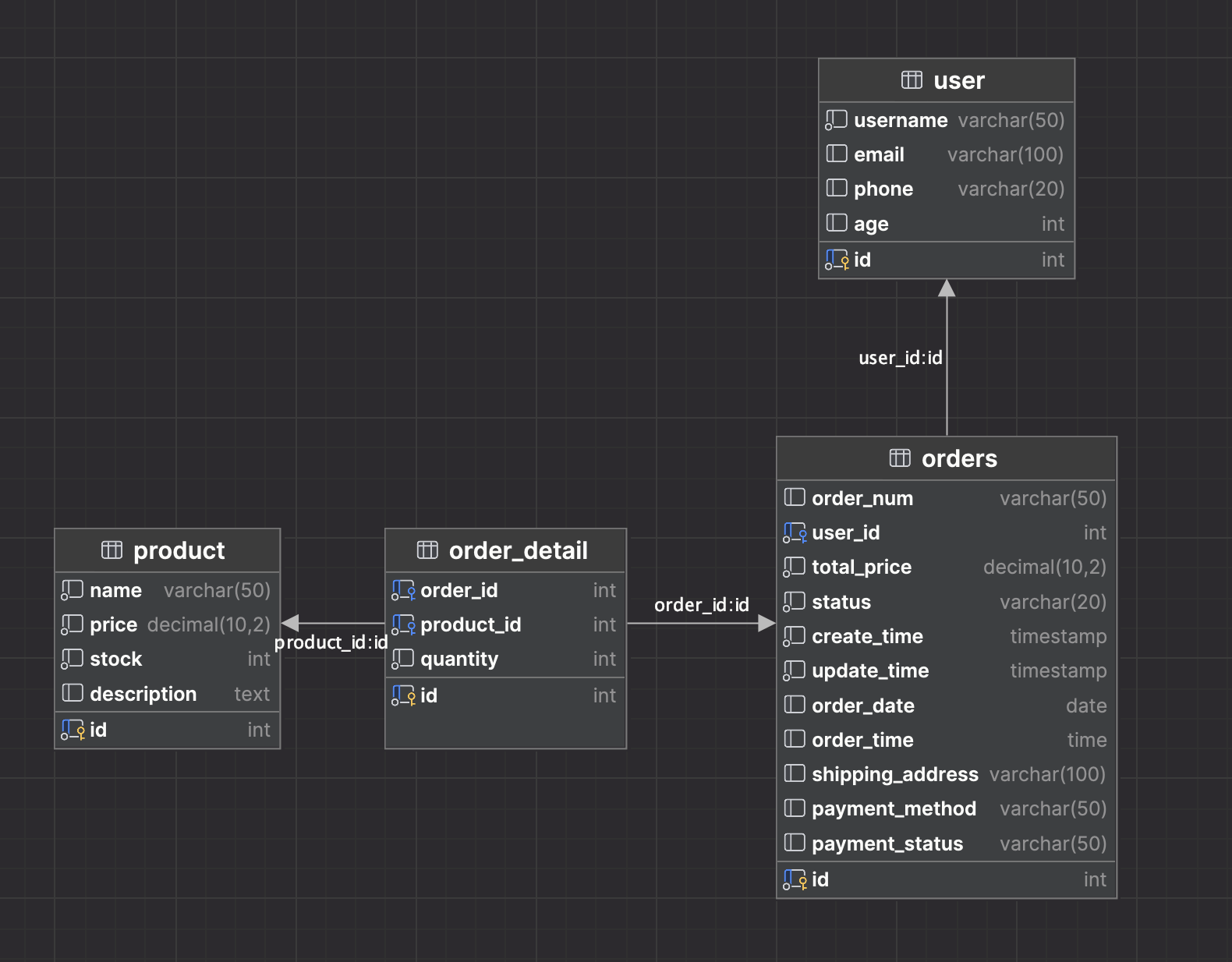
1. 建库与建表
sql
# 1.建库, 切库, 查表.
create database day03;
use day03;
show tables;

# 2. 创建数据表.
create table employee (
    id int,                 # 员工id
    ename varchar(20),      # 员工名
    deptid int,             # 部门id
    salary decimal(10,2)    # 工资
);
# 3. 添加表数据.
insert into employee values(1,'刘备',10,5500.00);
insert into employee values(2,'赵云',10,4500.00);
insert into employee values(2,'张飞',10,3500.00);
insert into employee values(2,'关羽',10,4500.00);

insert into employee values(3,'曹操',20,1900.00);
insert into employee values(4,'许褚',20,4800.00);
insert into employee values(5,'张辽',20,6500.00);
insert into employee values(6,'徐晃',20,14500.00);

insert into employee values(7,'孙权',30,44500.00);
insert into employee values(8,'周瑜',30,6500.00);
insert into employee values(9,'陆逊',30,7500.00);
# 4. 查看表数据.
select * from employee;
用户表(user)
- id: 用户ID,作为主键,并设置为自动递增
- username: 用户名
- email: 电子邮箱
- phone: 手机号码
- age: 年龄
sql
create table if not exists user(
   id int(11) primary key auto_increment,
   username varchar(50)  not null ,
   email    varchar(100) default null ,
   phone    varchar(20)  default null ,
   age      int(11)      default null
) engine = innodb default charset =utf8;
商品表(product)
- id: 商品ID,作为主键,并设置为自动递增
- name: 商品名称
- price: 商品价格(decimal,保留两位小数)
- stock: 商品库存
- description: 商品描述
sql
create table if not exists product(
   id int(11) primary key auto_increment,
   name  varchar(50)   not null ,
   price decimal(10,2) not null,
   stock int(11)       not null,
   description text    default null
)engine = innodb default charset =utf8;
订单表(orders)
- id: 订单ID,作为主键,并设置为自动递增
- user_id: 客户ID,与用户表关联的外键
- total_price: 订单总金额(decimal,保留两位小数)
- status: 订单状态("Completed"、"In Progress"等)
- create_time: 订单创建时间,默认为当前时间
- update_time: 订单更新时间,更新订单时自动更新为当前时间
- order_date: 订单日期(date类型)
- order_time: 订单时间(time类型)
- shipping_address: 配送地址
- payment_method: 付款方式(如信用卡、支付宝等)
- payment_status: 付款状态("Paid"、"Pending"等)
sql
create table if not exists orders(
   id      int(11)           not null auto_increment,
   user_id int(11)           not null ,
   total_price decimal(10,2) not null,
   status varchar(20)        not null,
   create_time TIMESTAMP not null default CURRENT_TIMESTAMP,
   update_time TIMESTAMP not null default CURRENT_TIMESTAMP on update current_timestamp,
   order_date date,
   order_time time,
   shipping_address varchar(100) not null ,
   payment_method varchar(50),
   payment_status varchar(50),
   primary key (id),
   foreign key (user_id) references user(id) on delete cascade
)engine = innodb default charset =utf8;
订单详情表(order_detail)
- id: 订单详情ID,作为主键,并设置为自动递增
- order_id: 订单ID,与订单表关联的外键
- product_id: 商品ID,与商品表关联的外键
- quantity: 商品数量
sql
create table if not exists order_detail(
   id int(11) primary key auto_increment,
   order_id   int(11) not null ,
   product_id int(11) not null ,
   quantity   int(11) not null ,
   foreign key (order_id)   references  orders(id)  on delete cascade,
   foreign key (product_id) references  product(id) on delete cascade
)engine = innodb default charset =utf8;
2. 添加数据
添加10个用户
sql
INSERT INTO `user` (`username`, `email`, `phone`, `age`)
VALUES
  ('张三', 'zhangsan@example.com', '13812345678', 25),
  ('李四', 'lisi@example.com', '13912345678', 30),
  ('王五', 'wangwu@example.com', '13612345678', 28),
  ('赵六', 'zhaoliu@example.com', '13712345678', 35),
  ('小明', 'xiaoming@example.com', '13512345678', 22),
  ('刘七', 'liuqi@example.com', '13212345678', 33),
  ('陈八', 'chenba@example.com', '13312345678', 27),
  ('杨九', 'yangjiu@example.com', '13112345678', 29),
  ('吴十', 'wushi@example.com', '13412345678', 31),
  ('马十一', 'mashiyi@example.com', '13012345678', 26);
添加10个产品
sql
INSERT INTO `product` (`name`, `price`, `stock`, `description`)
VALUES
  ('iPhone 15', 1999.99, 100, '苹果最新款智能手机'),
  ('Samsung Galaxy S21', 1899.99, 50, '三星旗舰级智能手机'),
  ('Huawei MateBook X Pro', 3499.99, 20, '华为轻薄笔记本电脑'),
  ('Sony PlayStation 5', 499.99, 80, '索尼次世代游戏机'),
  ('Bose QuietComfort 35 II', 299.99, 120, 'BOSE无线蓝牙耳机'),
  ('Nintendo Switch', 299.99, 100, '任天堂游戏机'),
  ('DJI Mavic Air 2', 999.99, 60, '大疆无人机'),
  ('Canon EOS R5', 3999.99, 30, '佳能全画幅数码相机'),
  ('Samsung QLED 4K TV', 1999.99, 70, '三星4K智能电视'),
  ('Xiaomi Mi Band 6', 49.99, 200, '小米智能手环');
添加30个订单
sql
INSERT INTO `orders` (`user_id`, `total_price`, `status`, `order_date`, `order_time`, `shipping_address`, `payment_method`, `payment_status`)
VALUES
(1, 100.50, '已完成', '2024-05-07', '10:00:00', '北京市朝阳区', '微信支付', '已支付'),
(2, 56.20, '已发货', '2024-05-07', '11:30:00', '上海市浦东新区', '支付宝', '已支付'),
(3, 220.00, '待发货', '2024-05-07', '13:45:00', '广州市天河区', '微信支付', '已支付'),
(4, 75.80, '已取消', '2024-05-07', '14:20:00', '深圳市福田区', '支付宝', '已支付'),
(5, 180.90, '已发货', '2024-05-07', '16:10:00', '成都市武侯区', '支付宝', '已支付'),
(6, 50.00, '待付款', '2024-05-07', '09:30:00', '北京市朝阳区', NULL, '未支付'),
(7, 120.00, '待付款', '2024-05-08', '14:00:00', '上海市静安区', NULL, '未支付'),
(8, 89.50, '待付款', '2024-05-08', '16:30:00', '广州市越秀区', NULL, '未支付'),
(9, 75.20, '待付款', '2024-05-08', '18:45:00', '深圳市南山区', NULL, '未支付'),
(10, 200.00, '待付款', '2024-05-08', '20:20:00', '成都市锦江区', NULL, '未支付'),
(1, 150.80, '已发货', '2024-05-09', '11:15:00', '北京市海淀区', '微信支付', '已支付'),
(2, 95.60, '已发货', '2024-05-09', '13:40:00', '上海市徐汇区', '支付宝', '已支付'),
(3, 180.00, '已完成', '2024-05-09', '16:00:00', '广州市白云区', '微信支付', '已支付'),
(4, 60.50, '已完成', '2024-05-09', '18:20:00', '深圳市龙岗区', '支付宝', '已支付'),
(5, 210.30, '已发货', '2024-05-09', '20:45:00', '成都市高新区', '微信支付', '已支付'),
(6, 80.00, '已完成', '2024-05-10', '09:10:00', '北京市朝阳区', '支付宝', '已支付'),
(7, 120.50, '待发货', '2024-05-10', '12:30:00', '上海市浦东新区', '微信支付', '已支付'),
(8, 45.20, '已取消', '2024-05-10', '15:15:00', '广州市天河区', '支付宝', '已支付'),
(9, 160.90, '待发货', '2024-05-10', '17:40:00', '深圳市福田区', '微信支付', '已支付'),
(10, 190.50, '已完成', '2024-05-10', '20:00:00', '成都市锦江区', '支付宝', '已支付'),
(1, 220.00, '已发货', '2024-05-11', '10:30:00', '北京市海淀区', '微信支付', '已支付'),
(2, 85.70, '已发货', '2024-05-11', '12:50:00', '上海市徐汇区', '支付宝', '已支付'),
(3, 130.00, '已完成', '2024-05-11', '15:15:00', '广州市白云区', '微信支付', '已支付'),
(1, 70.80, '已完成', '2024-05-11', '17:30:00', '深圳市龙岗区', '支付宝', '已支付'),
(2, 195.60, '已发货', '2024-05-11', '20:00:00', '成都市高新区', '微信支付', '已支付'),
(3, 110.30, '已完成', '2024-05-12', '09:20:00', '北京市朝阳区', '支付宝', '已支付'),
(1, 90.50, '待发货', '2024-05-12', '11:45:00', '上海市浦东新区', '微信支付', '已支付'),
(2, 40.20, '已取消', '2024-05-12', '14:30:00', '广州市天河区', '支付宝', '已支付'),
(3, 175.90, '待发货', '2024-05-12', '16:55:00', '深圳市福田区', '微信支付', '已支付'),
(4, 120.50, '已完成', '2024-05-12', '19:10:00', '成都市锦江区', '支付宝', '已支付');
添加 order_num 字段
sql
alter table orders
    add order_num varchar(50) after id;

update orders
set order_num = SUBSTRING(MD5(RAND()), 1)
where 1 = 1;
添加30条订单和产品的关联记录
sql
INSERT INTO `order_detail` (`order_id`, `product_id`, `quantity`)
VALUES
  (1, 1, 2),  (1, 3, 1),  (1, 5, 3),
  (2, 2, 1),  (2, 4, 2),  (2, 6, 1),
  (3, 1, 1),  (3, 3, 2),  (3, 5, 2),
  (4, 2, 3),  (4, 4, 1),  (4, 6, 3),
  (5, 1, 2),  (5, 3, 1),  (5, 5, 1),
  (6, 2, 2),  (6, 4, 3),  (6, 6, 2),
  (7, 1, 1),  (7, 3, 2),  (7, 5, 3),
  (8, 2, 1),  (8, 4, 1),  (8, 6, 2),
  (9, 1, 3),  (9, 3, 1),  (9, 5, 2),
  (10, 2, 1), (10, 4, 2), (10, 6, 1),
  (11, 5, 2), (11, 6, 1),
  (12, 7, 1), (12, 8, 2),
  (13, 8, 1), (13, 7, 2),
  (14, 6, 3), (14, 5, 1),
  (15, 9, 2), (15, 8, 1),
  (16, 7, 2), (16, 6, 3),
  (17, 5, 1), (17, 4, 2),
  (18, 3, 1), (18, 2, 1),
  (19, 1, 3), (19, 5, 1),
  (20, 6, 1), (20, 7, 2),
  (21, 8, 2), (21, 9, 1),
  (22, 8, 1), (22, 7, 2),
  (23, 6, 1), (23, 5, 2),
  (24, 4, 3), (24, 3, 1),
  (25, 2, 2), (25, 1, 1),
  (26, 6, 2), (26, 7, 3),
  (27, 8, 1), (27, 9, 2),
  (28, 5, 1), (28, 4, 1),
  (29, 3, 3), (29, 2, 1),
  (30, 1, 1), (30, 9, 2);
3. 查询练习(12道)
1. 获取用户ID为5的订单的订单号和订单日期
sql
select order_num, order_date
from orders
where user_id = 5;
2. 获取每个用户的订单数量,并按订单数量降序排序
sql
select user_id,COUNT(*) order_count
from orders group by user_id order by order_count desc;
3. 获取订单ID为10的订单的所有产品信息(产品名称、价格、数量)
sql
select name,price,quantity
from order_detail inner join db_test.product p on order_detail.product_id = p.id
where order_id=10;
4. 获取用户ID为1的所有订单的订单号、订单日期和产品数量总和,并按产品数量排序
sql
select order_id,order_num,order_date,sum(quantity) 产品数量
from orders inner join db_test.order_detail od on orders.id = od.order_id
where user_id=1
group by order_id
order by 产品数量 desc;
5. 获取订单日期在2023年1月份的所有订单的订单号、订单日期和产品数量总和,并按产品数量排序
sql
select order_id,order_num,order_date,sum(quantity) 产品数量
from orders inner join db_test.order_detail od on orders.id = od.order_id
where YEAR(order_date)=2023 and  MONTH(order_date)=1
group by order_id
order by 产品数量 desc;
6. 获取拥有产品名称为"Samsung Galaxy S21"的所有订单的订单号和订单日期
sql
select  order_num,order_date
from orders
         inner join db_test.order_detail od on orders.id = od.order_id
         inner join db_test.product p on od.product_id = p.id
where name = 'Samsung Galaxy S21';
7. 获取订单中产品数量大于等于3的订单号和订单日期
sql
select order_id,order_num,order_date,sum(quantity) -- 产品数量总和
from orders inner join db_test.order_detail od on orders.id = od.order_id
group by order_id
having sum(quantity)>=3;
8. 获取拥有产品价格在100到500之间的订单的订单号和订单日期
sql
select   distinct order_num,order_date
from orders
         inner join db_test.order_detail od on orders.id = od.order_id
         inner join db_test.product p on od.product_id = p.id
where price>100 and price<500;
9. 获取用户ID为4的订单中购买产品数量最多的产品名称、数量和价格
sql
select  name,price,quantity
from orders
         inner join db_test.order_detail od on orders.id = od.order_id
         inner join db_test.product p on od.product_id = p.id
         where user_id=4
         order by quantity desc,product_id
         limit 1;
10. 获取订单中产品数量最多的订单号和产品数量
sql
select  order_num,order_date,quantity
from orders
          inner join db_test.order_detail od on orders.id = od.order_id
          inner join db_test.product p on od.product_id = p.id
          order by quantity desc,product_id
          limit 1;
11. 获取产品价格最高的订单的订单号和产品价格
sql
select  order_num,name,price
from orders
          inner join db_test.order_detail od on orders.id = od.order_id
          inner join db_test.product p on od.product_id = p.id
          order by price desc,product_id
          limit 1;
12. 获取哪些订单的平均产品数量超过所有订单平均产品数量的订单号和产品数量
sql
select order_id, order_num, AVG(quantity) c
from orders
          inner join db_test.order_detail od on orders.id = od.order_id
group by order_id
having c > (select avg(quantity)
             from orders
                      inner join db_test.order_detail od on orders.id = od.order_id);
相关笔记
- MySQL 数据库基础 - DDL/DML/DQL语法与多表查询基础
- MySQL 开窗函数 - 开窗函数的使用
- MySQL 事务 - 事务的ACID特性与并发控制
- Python 操作 MySQL - pymysql 编程操作数据库